5/12/2019

Samsung FRP Reset File with Odin & Better FRP Reset Tool


What is FRP Lock?

Samsung FRP is basically a new built in security feature that has been introduced recently. The security feature that we are talking about can be found in android versions of lollipop 5.1 and higher. FRP stands for factory reset protection and what it basically does is that it prevents the use of the device after the factory reset. Which means that you if you want to continue using your phone then you have to provide the Google username and password that was already set up on the phone. But what if you don’t have access to the email account anymore and you forgot the password of the account as well? Say goodbye to the phone? Probably not. So, without any further due, let begin how to bypass FRP lock with Odin and a better Samsung FRP reset tool.


How to Use Samsung FRP Reset File with Odin to Bypass FRP Lock?

Odin has been a life saver for so many Samsung smart phones and this time it has come to the rescue again. Odin is basically a software that has been developed by Samsung. It can be used to install firmware to a Samsung Android device. Now how to use it to bypass Samsung FRP. Following are the step by step instructions on how to reset Samsung FRP with Odin.


Download the Samsung FRP Reset file matched with your device and place it in a new folder on your Desktop.


Install Odin on your computer and then Samsung USB drivers on your windows.


Now you have to boot your phone into download mode or Odin mode. You can do that by pressing and holding power, Bixby (home) and volume down button at the same time.


After a few seconds, you will see a blue or green screen depending upon your phone model. Once you see the screen, you are only required to click the volume up key to boot into the Odin.


Now go to your PC and run Odin.


Connect your device with the PC.


On the Odin, click on the AP Tab and select the downloaded reset file.


Respectively do the below files to:


BL: select file BL_xxxxx


CP: choose file CP_xxxxx


CSC: select file CSC_xxx_xxx_xxxxxx


Click on Start and once you see pass the message you are ready to unplug the phone and start using it.Also Read:10 Websites to Watch Indian Live Television


Also Read:10 Best FRP Bypass APKs to Bypass Google Account Verification on Android


Also Read:Top 19 Best Websites Like VipBox for You to Watch Sports Stuff in 2019


Also Read:6 Best Free Photo Editing Apps for iPhone/iPad (2019)


Why is Odin not recommended?

This is a difficult and complex way to bypass the FRP for the one who doesn’t know about tech.

The reset file can be faulty sometimes, or you can’t find the matched file for your device.

4/22/2019

Despite Of Ban in India, TikTok Owner ByteDance Planning $1 bn Investment in India


After the Madras HC had it banned in the entire state, TikTok was soon scrutinized by the SC for its sleazy and purportedly pornographic content and witnessed a complete ban in India with the SC(Supreme Court) even demanding Google and Apple to remove the app from their respective stores. In a fresh development, ByteDance, the owner of the controversial app TikTok is still “hopeful” as it is planning to invest $1 billion in the country over a period of three years.


Apart from TikTok, ByteDance also hosts other apps like Helo and Vigo Video in India. ByteDance Director (International Public Policy) Helena Lersch said, “We are obviously disappointed by the current developments, but we are also very optimistic that we will resolve this issue. We remain committed to our Indian users. As a company, we are looking to invest USD 1 billion over the next three years in India, that is how bullish we will remain to be here.” It is also going to employ nearly 1,000 people in India by the end of this year.

TikTok is the most popular app in India with a 120 million user base. It is still a popular app amongst teenagers (and adults alike). While the ban may affect people who were eager to install the app, those already using the app can continue to use it as there are currently no measures regarding that.Also Read:Top 25 Best Netflix Cookies for You to Use Netflix for Free 2019
Also Read:Top 10 iPhone Emulators for Windows PC, Mac and Android 2019
Also Read:Download Latest Samsung USB Drivers for Mobile Phones on Windows
Also Read:Download Korean Drama for Free 2019
Also Read:Websites Like PrimeWire
Also Read:KissAnime Alternative Websites


4/15/2019

Samsung Galaxy S10+ Review: A Versatile Flagship!

Samsung Galaxy S10+ Review: A Versatile Flagship!


On paper, the Samsung Galaxy S10+ seems to have it all. It is definitely an impressive smartphone featuring a beautiful punch-hole Infinity-O display, oodles of RAM and storage, a versatile camera, and more. But every Samsung smartphone in the past has been equally impressive on paper. How does the Galaxy S10 actually fare in real-life use?

The Galaxy S10 series marks the 10th iteration of Samsung’s flagship Galaxy S lineup. Unlike the Galaxy S9 from last year, Samsung has shaken things quite a bit with a number of new features and set the bar once again for other smartphone OEMs like Apple to follow. It also gives us a glimpse at some of the features the 2019 iPhone 11 series will pack.

Note that while I am reviewing the Galaxy S10+ here but all the things below will also apply for the Galaxy S10.
Samsung Galaxy S10+ Review
Build Quality

The Galaxy S10 builds on the design that Samsung first debuted with the Galaxy S8 in 2016. By switching to an Infinity-O panel at the front and reducing the top and bottom bezels, Samsung has managed to make the Galaxy S10 standout even more.

Like previous flagship Galaxy devices, the Galaxy S10 essentially sandwiches an aluminum frame with Gorilla Glass panels — Gorilla Glass 6 at the front and Gorilla Glass 5 at the rear. It packs all the bells and whistles that one can think of as well like IP68 certification, USB-C connectivity, a headphone jack(!), wireless charging, and stereo speakers. The stereo speakers are massively improved from the Galaxy S9 and Note 9. They are louder and the stereo effect is also more pronounced this time around.


The degree of the display curve has changed and coupled with the switch to a slightly taller aspect ratio display, the Galaxy S10+ feels comfortable to hold in hand. However, with its massive 6.4-inch QHD+ display, the Galaxy S10+ is simply too big for one-hand use.

Another design oddity on the Galaxy S10+ is the absurdly high power button. It is placed way too high and its placement would require one to always adjust their grip before/after pressing it.

I am not going to argue here as to where the ‘O’ cutout in the display is worse or better than a notch. However, for all intents and purposes, it fades away into the background as one starts using the Galaxy S10.


The Galaxy S10 also comes with an ultrasonic in-display fingerprint scanner. It is not as fast the capacitive fingerprint scanner used by Samsung in its previous flagship devices but it is still better than the optical fingerprint scanner we have seen the likes of Oppo and OnePlus use in their devices. It is far more accurate and more forgiving to debris and dirt than optical in-display fingerprint scanners. It is important to note that one does not need to keep their finger on the fingerprint scanner and wait for the device to unlock. Instead, just like capacitive fingerprint scanners, keeping your finger on the scanner for a second and then lifting it is good enough.


There’s also face unlock on the Galaxy S10 but it is simply not as secure as Face ID on the iPhone X/XS. In fact, Samsung’s implementation is worse than other Android OEMs as well since the Galaxy S10’s face unlock works even when your eyes are closed. On OnePlus 6T, the phone will only unlock if you are looking at the device and your eyes are open. This is definitely an area on which Samsung needs to work since this is a major security and privacy issue.
Display

Ever year, with its new flagship device, Samsung sets a new standard for mobile displays. And this year with the Galaxy S10, it has repeated the same formula. This time around, the company is using a new Dynamic AMOLED panel on the Galaxy S10 series which offers a peak luminance of 1,200 nits, impeccable color accuracy, great viewing angles, HDR10 support, and more.


I will skip all the jargon here and come straight to the point. The Galaxy S10’s display is big, beautiful, and accurate. It really has no faults. The insanely high brightness levels and low reflectance means the display is clearly visible even under the harshest of sunlight. The beautiful display is complemented by the extremely thin top and bottom bezels which further add to the immersive look.

I am actually surprised at how Samsung has managed to raise the smartphone display bar so high with the Galaxy S10. It will definitely be interesting to see how Apple responds with the iPhone 11 later this year. Apple sources OLED panels for the iPhone X/XS series from Samsung itself and makes its own set of improvements to it.
Camera


The primary camera on the Galaxy S10 is the same as the one found on the Galaxy Note 9 and Galaxy S9 from last year — a 12MP sensor with 1.4um large pixels and an f/1.5-f/2.4 aperture. The performance of the primary camera is typical Samsung — photos are always slightly overexposed, fine details are sacrificed to reduce noise, and moving subjects are always blurry in low-light. But in typical Samsung fashion as well, the dynamic range in photos is impressive, focus is always quick and spot on, and unlike Huawei and other Chinese vendors, Samsung does well to not overly boost colors and saturation.

The highlight of the Galaxy S10’s camera setup is the versatility and flexibility offered by it. The primary 12MP camera is accompanied by a 16MP f/2.2 ultra-wide angle shooter. While its quality is not as good as the primary sensor, especially in low-light, taking photos from the ultra-wide angle shooter is a lot of fun. This is something that you really need to experience for yourself to understand.

There’s also the 12MP telephoto sensor which offers 2x optical zoom that has not really seen any major improvements for a couple of years now. It is capable of taking decent shots in daylight and its best to avoid using it altogether in low-light scenarios.


Despite the Galaxy S10 not beating the Pixel 3 in the camera department, I would pick the former. That’s because unlike the Pixel, the Galaxy S10 has a stable and faster camera app complemented by a more versatile camera system. Plus, the S10’s camera also has decent video recording capabilities. One can switch between the three cameras while recording videos which adds to its versatility. The Galaxy S10 is also among the very few devices in the market that is capable of recording videos in HDR10.Also Read:sites Like PrimeWire

Also Read:KissAnime Alternative Websites


One major oversight of the rear camera is the lack of a Night Sight mode. We have seen the likes of Google, Huawei, OnePlus, and others include a Night mode in their smartphones that is optimized to take photos in extreme low-light scenarios. While the Galaxy S10 does come with a Night mode, it cannot be enabled automatically. Instead, it triggers itself on automatically when the amount of light drops below 1 lux. Even then, the end results are not that impressive and Samsung’s Night mode implementation is nowhere near Google or Huawei.


The front 10MP DualPixel camera on the Galaxy S10 series might seem like a major improvement over previous flagship Galaxy devices but the reality is a bit different. The dynamic range has definitely improved and the DualPixel autofocus means selfies will be considerably sharper. However, Samsung’s image processing simply kills all the selfies taken on the Galaxy S10. It applies a gracious amount of skin smoothening effect even when the beauty filter is turned off which leads to all fine details being wiped away.

This becomes a major issue in low-light scenarios where selfies turn out relatively soft and look a bit odd due to their lack of details. Samsung and other OEMs need to take a cue from Google — and Apple to a certain extent — on how to optimize the front camera’s image processing.

As for the secondary depth sensor on the Galaxy S10+, it is really not that useful. I hardly found any improvement in Live Focus photos taken with the Galaxy S10+ when compared to the regular Galaxy S10.
Software

Software has always been Samsung’s Achilles Heel. The company has always managed to release smartphones with top-notch hardware but they have always faltered in the software department.

With its new One UI, Samsung is turning a new leaf when it comes to software. Its new One UI is definitely impressive and packs plenty of customization options and features. Samsung has also managed to cut down on the number of unnecessary features and bloatware which helps in improving the overall experience of using One UI.If you lost data after you updated to a new iPhone, you can always use Gihosoft iPhone Data Recovery to get the data back from the old iPhone or backup. You may also like:iphonerecovery.com

If you use android phones, please choose Gihosoft Android Data Recovery.With Gihosoft Android Data Recovery, no longer afraid of data loss!

Must read:Youtube video downloader for pc

Also Read:sites Like PrimeWire

Also Read:KissAnime Alternative Websites


Based on Android 9.0 Pie, One UI comes with almost all features that one can think of. This includes Digital Wellbeing, Do Not Disturb, Blue light filter, navigation gestures, and more. Samsung’s Navigation gestures are not as good as that of iPhones and there’s clear room for improvement here though.

A special note for the Galaxy S10’s Night mode here. With iOS 13 and Android Q, we are likely going to see Apple and Google embrace a system-wide dark mode. Samsung, however, has beaten them to the punch with Night mode in One UI. Samsung’s implementation is downright fantastic and it looks even better of the Dynamic AMOLED display of the Galaxy S10.


Power users must also install Samsung’s own Good Lock app from the Galaxy Store. It offers a number of modules and low-level customization options suited for them. This includes customizing the Always-On Display clock, enhancing the overall multi-window experience, and more.

As for software updates, Samsung has really improved in this front. While you are not going to get major Android updates within weeks of Google releasing it, Samsung is at least rolling out monthly security updates for its devices.
Performance and Battery Life

Outside of the United States and a few other markets, Samsung is selling the Galaxy S10 series with its own 8nm Exynos 9820 chipset. Developed in-house by Samsung, this chip is simply not as good as the Snapdragon 855-powered variant sold in the United States. This is going to matter if you are a heavy gamer or a benchmark junkie. But regular users are hardly going to notice this.

In day-to-day use, the Galaxy S10 performs remarkably with no lags or stutters. Samsung has clearly spent time optimizing One UI for smoothness and it shows. The impressive performance is also helped by the fact that the Galaxy S10 and S10+ come with a minimum of 8GB RAM. That makes these phones an absolute powerhouse when it comes to multitasking.

While playing heavy games like PUBG or Fortnite, the Galaxy S10+ performs well enough. It does show some signs of lag and drops frames every once in a while but the overall performance is still great.


It is primarily in the battery life department where the Exynos 9820-powered variant of the Galaxy S10 falls behind its Snapdragon 855 variant. Despite this, you need not worry about making it through a day of heavy use with the Galaxy S10+. That’s thanks to Samsung including a massive 4,100mAh battery on the device and also optimizing its idle power consumption. While not as good as the likes of the iPhone XS Max, the Exynos 9820-powered Galaxy S10+ can still offer around 4-4.5 hours of Screen-on Time on a single charge.

On the charging front, the Galaxy S10+ comes with 15W wired fast charging and 12W Qi wireless charging. The 15W wired fast charging is definitely disappointing since Huawei, OnePlus, Vivo, and others are now offering 2x the fast charging speeds on their devices. But it is still far better than the 5W adapter that Apple bundles with its $999 iPhone XS.

On the bright side, the Galaxy S10 series supports USB-PD and Quick Charge as well. This means irrespective of which fast charger you use, the device will charge at its full 15W capacity.

As for 12W wireless charging, its definitely a nice addition. What’s nice is the inclusion of reverse wireless charging a.k.a Wireless PowerShare on the Galaxy S10 series. With this feature, one can wirelessly charge other devices using their Galaxy S10.

At 4.5W, Wireless PowerShare is good enough to charge small smartphone accessories like the Galaxy Buds, AirPods with wireless charging case, and more. It can also be used to charge other smartphones, though it is a bit impractical and only suited for niche cases. What’s even better is that one can use Wireless PowerShare while charging the Galaxy S10 itself. This makes the feature a boon to have for heavy travelers.

Reverse wireless charging in smartphones is definitely going to get more accessory makers to include wireless charging in their devices. This will ensure that one only needs to carry their phone charger with them while traveling.
Conclusion

The Galaxy S10+ has a lot going for it. A great display, an equally great build quality, a versatile camera, one-day battery life, wireless charging, and useful features like Wireless PowerShare. With One UI, Samsung has also fixed its software issues for good. For 2019, Samsung has set the bar for other flagship phones to follow with its Galaxy S10 series and Apple should take note of this.

3/19/2019

Download iOS 12.2 Public Beta 6 (IPSW/OTA Profile)

Download iOS 12.2 Public Beta 6 (IPSW/OTA Profile)

Apple has seeded the public and developer beta updates to iOS 12.2. Here’s how you can get these updates for iPhone and iPad.
WHAT’S NEW IN IOS 12.2 BETA 6?

The size of iOS 12.2 Beta 6 update is a mere 120MB, yet it packs quite a lot of new features and user interface enhancements. Its build number is 16E5227a.

Here is the complete list of changes that this version brings –


A new warranty section in Settings > General > About. It displays the time left for the device’s warranty to expire.


Addition of Apple Care to the Settings app.


In spite of all its features, it comes with its fair share of bugs. For instance, some users have reported that iMessage messages are displaying random contacts instead of actual contacts.

You can get this update for your Apple device using the download links given below. If, however, you own a paid developer account, downloading and installing this version from Apple Developer Center is recommended.
IOS 12.2 BETA 6 DOWNLOAD
OTA PROFILE


Download
IPHONE


iPhone SE, iPhone 5s


iPhone 6s, iPhone 6


iPhone 6s Plus, iPhone 6 Plus


iPhone 8, iPhone 7


iPhone 8 Plus, iPhone 7 Plus


iPhone X


iPhone XS


iPhone XS Max


iPhone XR
IPAD


iPad Air, iPad mini 2


iPad mini 4, iPad Air 2, iPad mini 3


iPad (5th generation), iPad (6th generation)


Pro iPad (9.7-inch)


iPad Pro (12.9-inch)


iPad Pro (10.5-inch), iPad Pro (12.9-inch) (2nd generation)


Pro iPad (11-inch), iPad Pro (12.9-inch) (3rd generation)
IPOD


iPod touch (6th generation)
SHOULD YOU UPGRADE YOUR DEVICE?

With the release of the sixth beta, we’re definitely inching closer to the GM build. Judging by the build number of the current update, it’s highly likely that Apple will seed another beta sometime during the next week.

Therefore, it’s better to hold off an update for a week or two so you can move straight onto the final Golden Master build.

Nevertheless, you can update your device right now if you want the aforementioned features on your iPhone or iPad right now.

Also Read:jihosoft Free iPhone Data Recovery

Sponsor ads:

Gihosoft Free iPhone Data Recovery:https://www.gihosoft.com/iphone-data-recovery-free.html

Gihosoft iPhone Data Recovery Free

Free iPhone Data Recovery Software for Windows/Mac

Recover up to 12+ types of files, including contacts, SMS, photos, WhatsApp, Viber, notes, etc.

Restore lost data from iOS devices directly or from iTunes and iCloud backup

Recover iPhone data lost due to iOS upgrade/jailbreak, accidental deletion, device lost or broken

Support all the latest iPhone, iPad and iPod Touch

Both Free and Pro version.


If you lost data after you updated to a new iPhone, you can always use Gihosoft iPhone Data Recovery to get the data back from the old iPhone or backup.You may also like: iphonerecovery.com

3/17/2019

6 Android Q Betas Planned By Google; Stable Release In Q3


Following numerous rumors and speculations, Google has finally made its next-gen Android Q operating system official, by releasing its first beta. In addition to this, Google has provided a timeline of all the beta versions before the OS goes official for the general public.

Android Q Beta will comprise six beta programs, starting today and until Quarter 3 of 2019 (preferably in August 2019) when Android Q will be available to all.

Beta 1 is the first release that has been introduced, followed by Beta 2 (incremental update), Beta 3 (another incremental update), and Beta 4 (inclusive of final APIs and official SDK) expected to be released in April, May, and June, respectively.

Beta 5 and Beta 6 involve candidate releases for testing and will be available in Q3, 2019. Following this, the final version of Android Q will be made available to the users.

Under the beta program, the first three beta versions are aimed at helping users figure out the device and app compatibility with the new OS, while the Beta 4 lets users access the final APIs and SDK.


Lastly, beta 5 and 6 will provide beta users with the release candidate builds.

As a reminder, the beta program is presently available for Google Pixel family users(Pixel, Pixel XL, Pixel 2, Pixel 2 XL, Pixel 3, and Pixel 3 XL).

Additionally, to get hold of the beta program, users can either download the factory image and flash or manually sign up for the beta program.Also Read:jihosoft Free iPhone Data Recovery

Sponsor ads:

Gihosoft Free iPhone Data Recovery:https://www.gihosoft.com/iphone-data-recovery-free.html

Gihosoft iPhone Data Recovery Free

Free iPhone Data Recovery Software for Windows/Mac

Recover up to 12+ types of files, including contacts, SMS, photos, WhatsApp, Viber, notes, etc.

Restore lost data from iOS devices directly or from iTunes and iCloud backup
Recover iPhone data lost due to iOS upgrade/jailbreak, accidental deletion, device lost or broken

Support all the latest iPhone, iPad and iPod Touch

Both Free and Pro version.

If you lost data after you updated to a new iPhone, you can always use Gihosoft iPhone Data Recovery to get the data back from the old iPhone or backup.You may also like: iphonerecovery.com

6 Best Bus Ticket Booking Apps for Android in India


Best Bus Ticket Booking Apps for Android in India:


RedBus


MakeMyTrip


Yatra


PayTM


AbhiBus


Goibibo
1. RedBus

RedBus is assuredly one of the best Bus ticket booking apps in the field with a total of 10 million + downloads from the google play store.

It allows users to search and find all available buses and its details in your required locations. One can simply complete the ticket booking process at a glance using the one-touch secure payment provided.

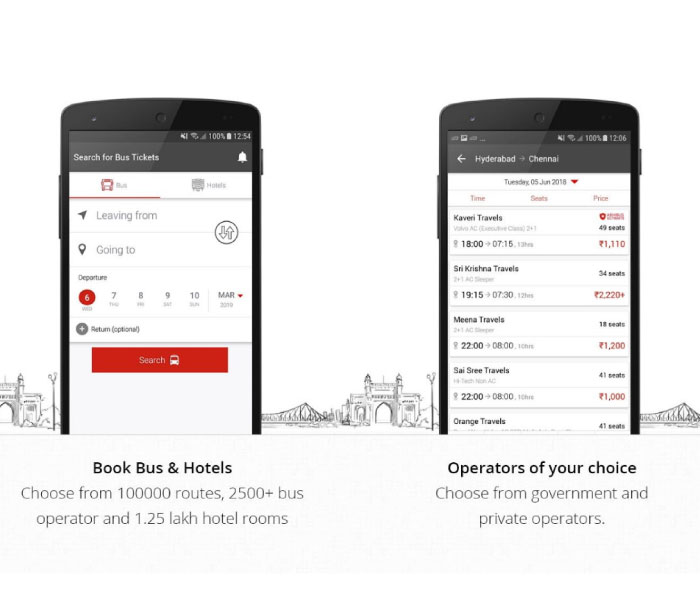
The app has almost 2,300 bus operators including governmental services as well as private services. It also delivers features such to cancel booked ticket in case of any inconvenience and live bus tracking option to get live updates about the bus.


Main Features:


Filter & Search


One-Touch Payment


Cancellation policy

Download RedBus
2. MakeMyTrip

MakeMyTrip is yet another well-known app for travel ticket bookings. The app helps users to search and find a suitable bus for the required journey from around 1,300 of available bus operators.

The app also features services such as flight ticket booking, hotel booking, IRTC railway ticket booking, Cabs etc. Users can either use the MakeMyTrip app or Website to use these services.


Main Features:


Choose from different operators


Discount offers


Hotel, IRTC bookings and more

Download MakeMyTrip
3. Yatra

As the name suggests, the app is all about travel bookings. Yatra provides a wide variety of bus services to choose from according to your budget and necessities.

Other than Bus bookings, the app also supports Flight ticket bookings, Hotel bookings and cab, Train ticket bookings etc. Payments can easily be done using the app itself through a secured payment gateway.

Users referring their friends gets eCash in return, which can be used to claim discounts on a variety of services featured by the app.


Main Features:


Numerous services


Secured payments


Earn eCash for discounts

Download Yatra
4. PayTM

We have already covered a lot about PayTM app and its features in several articles. For your information, PayTM is also a well-known app for travel ticket bookings too. Users can choose the right travel partners from the provided list according to their interests.

One can simply search and filter to find buses of your choice and easily make payments either using your bank account or your PayTM wallet money. The app also has a lot of discount coupons, promo codes, cashbacks and many more to offer.


Main Features:


All in One app


Variety of operators


Cashbacks, discounts and more

Download PayTM
5. AbhiBus

AbhiBus is one of the easiest apps among all these bus ticket booking apps. Users can merely choose required bus services from 2,500 different bus operators featured which include both governmental as well as private services.

One can simply sign up to AbhiBus using a Facebook or Google Account. The app ensures a secure payment gateway along with an option for easy ticket cancellation.


Main Features:


Easy login


More than 2500 operators


AbhiCash for discounts

Download AbhiBus
6. Goibibo

With a total of 10 Million users, Goibibo simply provides hassle-free ticket trip booking service at any moment. Users can book bus tickets, flight tickets, hotel, IRTC train tickets etc.

The app gives Rs.100 GoCash for every new user login which can be used to claim discounts on any service offered in the app. Goibibo also gives the option to track your bus in order to get its live location and status.


Main Features:


Flawless experience


Track your bus


GoCash discount

Download Goibibo

These were our top picks for the best bus ticket booking apps for your Android device. If you liked the content don’t forget to share it with your friends.Also Read:jihosoft Free iPhone Data Recovery

Sponsor ads:

Gihosoft Free iPhone Data Recovery:https://www.gihosoft.com/iphone-data-recovery-free.html

Gihosoft iPhone Data Recovery Free

Free iPhone Data Recovery Software for Windows/Mac

Recover up to 12+ types of files, including contacts, SMS, photos, WhatsApp, Viber, notes, etc.

Restore lost data from iOS devices directly or from iTunes and iCloud backup

Recover iPhone data lost due to iOS upgrade/jailbreak, accidental deletion, device lost or broken

Support all the latest iPhone, iPad and iPod Touch

Both Free and Pro version.

If you lost data after you updated to a new iPhone, you can always use Gihosoft iPhone Data Recovery to get the data back from the old iPhone or backup.You may also like: iphonerecovery.com

3/12/2019

Buying iCloud Locked iPhone and iCloud Solutions

Buying iCloud Locked iPhone and iCloud Solutions
Part 1. What Does It Mean to Buy iCloud Locked iPhone?

Let’s say you wanted to buy a good, used iPhone. After searching for a nice one, you finally find it; the phone looks neat, precisely what you had in mind. You then try to turn it on, and you are greeted with a bold message telling you that this beautiful phone is iCloud locked or Activation locked. This is usually a red flag.

Meeting iCloud Activation Lock or iCloud Lock on an iPhone for sale, what comes into your mind first is that the phone was stolen. However, not all locked iPhones are stolen phones; some iPhone owners merely forget to log out or remove their iCloud account from the iPhones via Find My iPhone before selling the phones. Some iPhone is just locked by an iCloud account but you still can access to it. But you can’t enjoy most of the iCloud features cause you don’t have the password of it. Without proper software to remove iCloud account on activated device, it’s OK to buy iCloud locked iPhone.
Part 2. Before You Buy iCloud Locked iPhone

First and most importantly, before you buy iCloud locked iPhone, you must find out from the seller if the iPhone was stolen or not. It is never a good idea to purchase a stolen item, especially an iPhone, because, amongst other things, the owner can track you down through Find My iPhone. Finding you is a whole different story because you wouldn’t even be able to use the iPhone in the first place.

If the iPhone is not stolen, ask the seller to contact the original owner of the iPhone, so that he/she can sign in to Find My iPhone with their Apple ID and turn off Find My iPhone and the Lost Mode.


The original owner can unlock the iPhone in some other ways, which include visiting an Apple Store and asking them to remove whatever lock is there. Confirm that the lock has been removed before you buy any iCloud locked iPhone and make sure that they have erased all the content and settings on it.


Part 3. After You Buy iCloud Locked iPhone

If the seller cannot contact the original owner of the iPhone, you can still bypass the issue with alternatives. If you can use the phone, and it is locked only with iCloud, you can remove the Apple ID with a robust program called iMyFone LockWiper. If you have already purchased the locked iPhone, it’s not the end of the world; this program will also help you remove any associated Apple ID from the iPhone.

iMyFone LockWiper is a robust software designed for bypassing or removing passwords and locks from Apple devices, including iPhones, iPads, and iPod touch. Not only does it support all Apple devices, but this powerful program is also compatible with all iOS versions. What you will absolutely love about iMyFone LockWiper is its intuitiveness and ease of use.Also Read:8 Best To-do List Apps for Your iOS Device to Make Your Work Done
Also Read:Windows 10 Blue Light Filter: Learn Something about Your Eyes Saver

Also Read:Top 5 Best Free File Recovery Software 2019 for Windows and Mac

Also Read:18 Best Indian Web Series on YouTube You Can’t Miss 2019